Microsoft Intune Consulting & Deployment

WINDOWS AUTOPILOT MICROSOFT ENDPOINT MANAGER INTUNE DEVICE MANAGEMENT ENDPOINT SECURITY ACTIVE DIRECTORY USER LEVEL RESTRICTIONS DEVICE COMPLIANCE BASELINE CONFIGURATION CLOUD SERVICES

Power your business transformation with Azure, cloud, IT support, Intune device management and Microsoft Endpoint Manager solutions through expert Microsoft Intune consulting.

As Seen On
leaf-left-clr
leaf-right-clr

And 450+ News Sites

Microsoft Intune

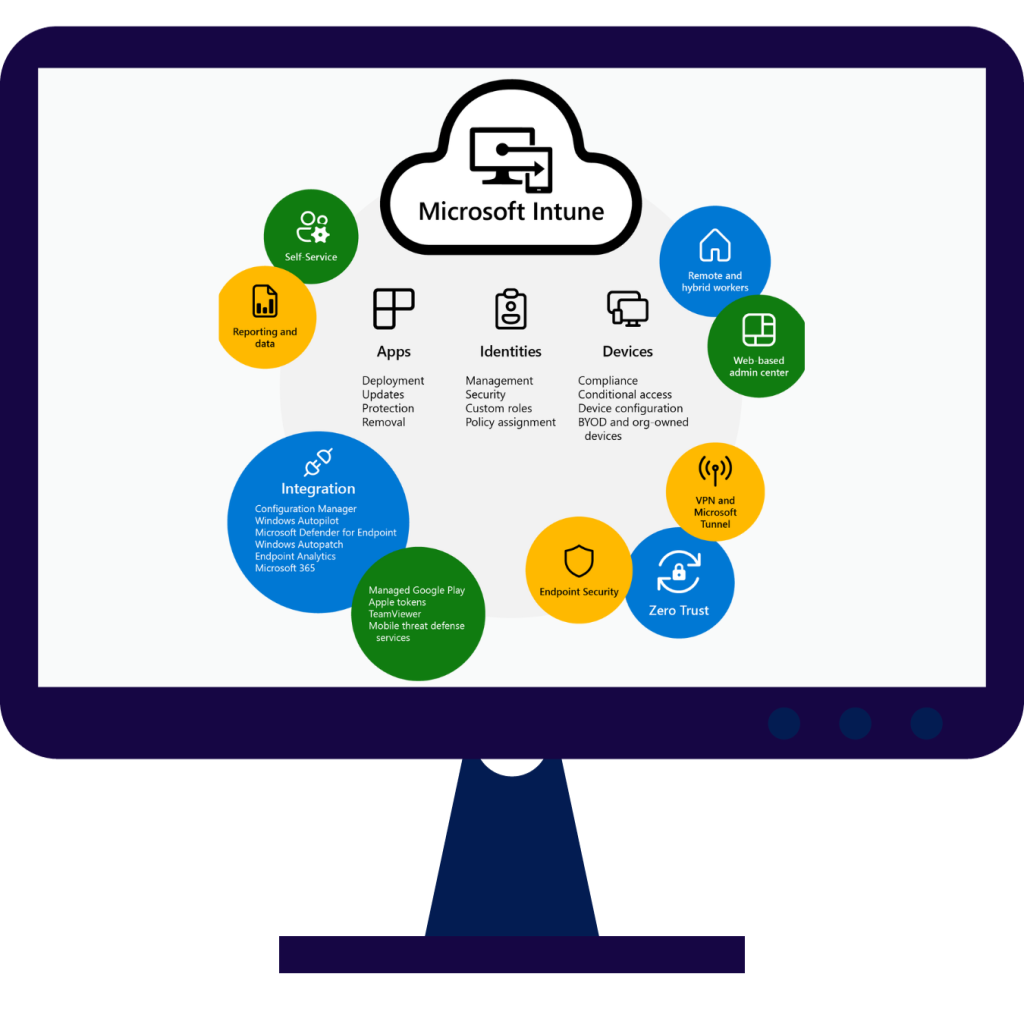
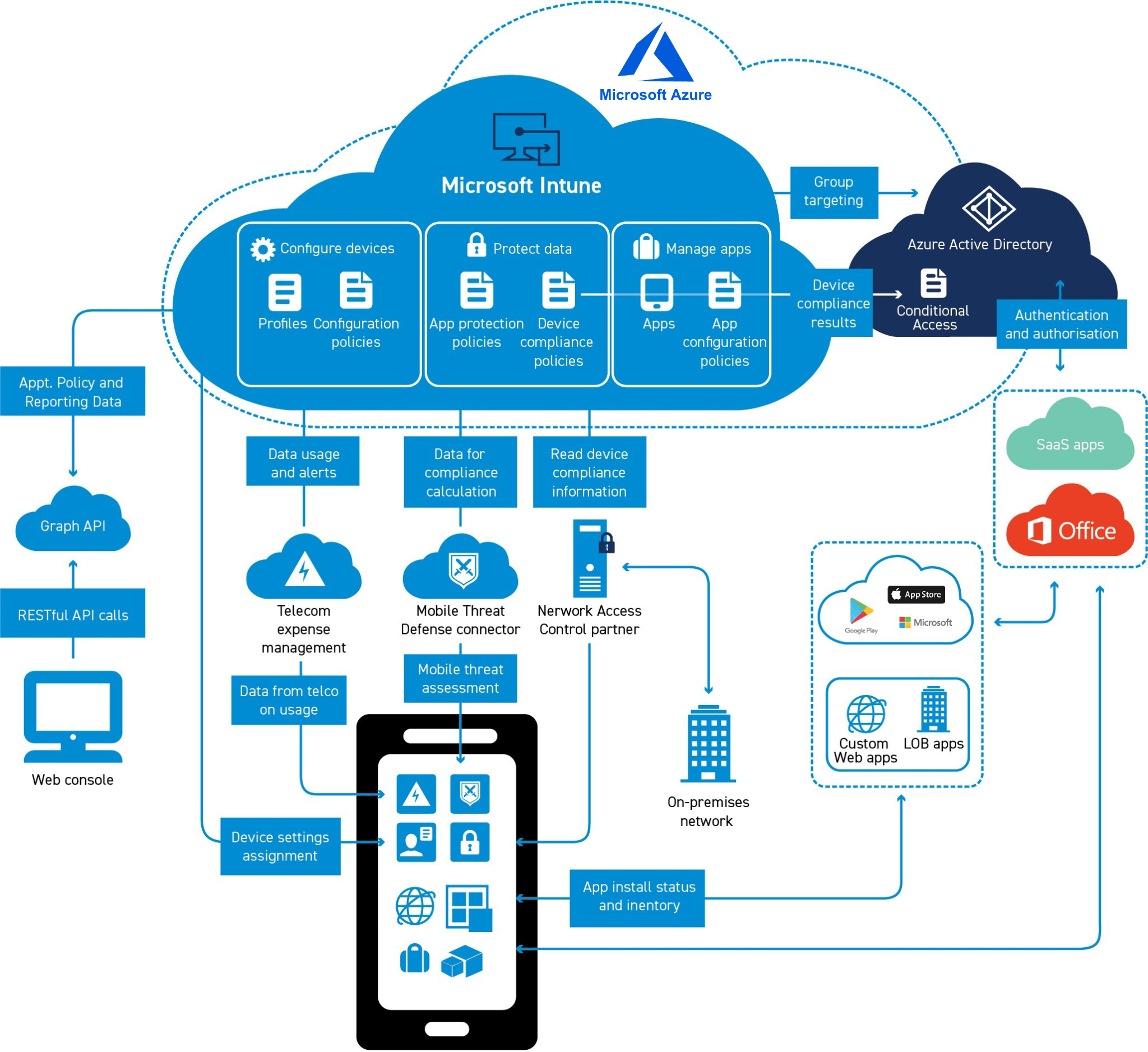
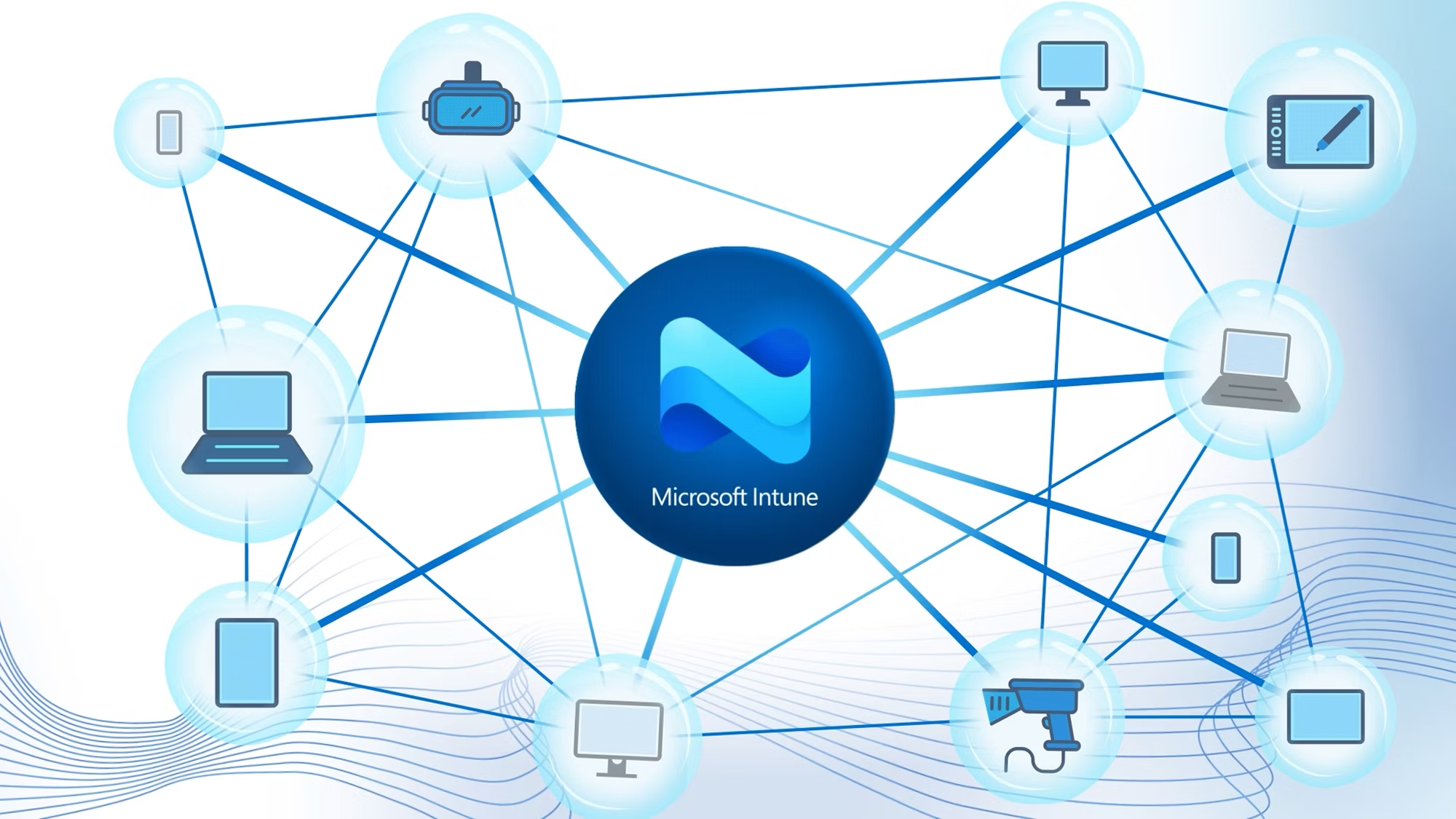
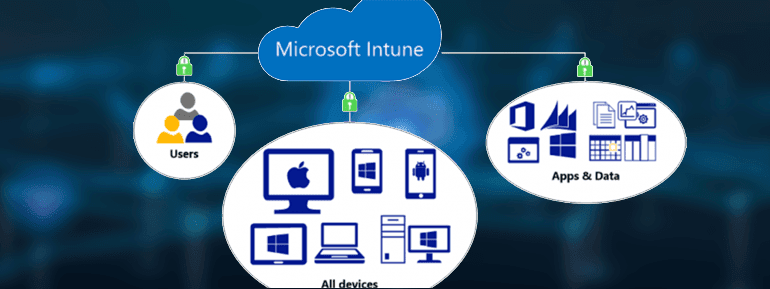
Microsoft Intune is a cloud-based solution for comprehensive endpoint management. It streamlines the administration of applications and devices across various platforms, including mobile devices, desktop PCs and virtual endpoints. Intune device management enables organisations to enforce security policies, manage user access and maintain compliance with a zero-trust security framework. The Microsoft Intune portal simplifies oversight while the Microsoft Intune company portal enhances user access. With features such as Microsoft Intune management extension and the integration of Microsoft Endpoint Manager, businesses gain end-to-end visibility.

TECHOM Systems delivers Microsoft Intune Consulting & Deployment Services that ensure a strategic and compliant deployment from the ground up. The Intune consultant team assists in implementing security-focused configurations and supports long-term management through advanced policies.

What is Intune
Manage Applications - MAM -TOS

Manage Applications (MAM)

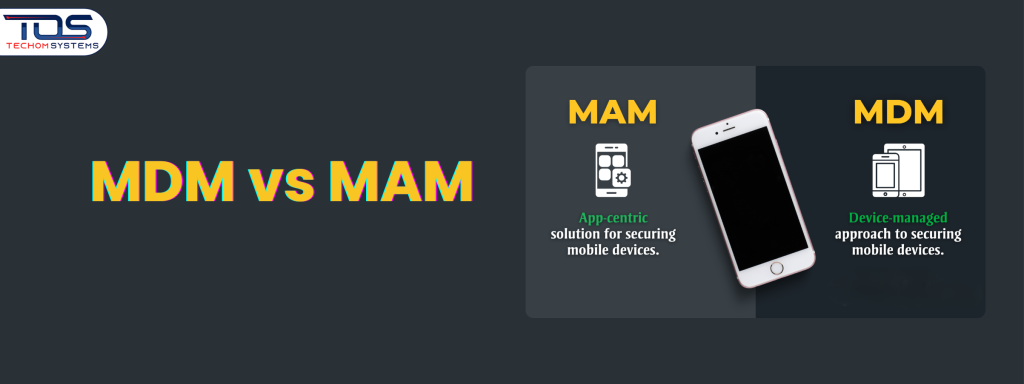
With Mobile Application Management, businesses secure application-level data without intune device management. We deploy Microsoft Intune policies to prevent data leakage from corporate apps to personal storage, ensuring protection on BYOD and enterprise environments.

Transform Management and Exercise

Manage Devices (MDM)

Microsoft Intune consultant services include configuring Mobile Device Management (MDM) with Autopilot deployment. These Intune managed services provide IT administrators with the tools to manage assets used by a modern workforce, enforce configuration policies, and secure devices across the enterprise.

Microsoft Endpoint Manager - TOS

Microsoft Endpoint Manager

Our Endpoint Manager services use Microsoft Intune Endpoint Management to manage and secure endpoints, delivering your setup strong endpoint protection through Microsoft Defender ATP, disk encryption, firewalls, advanced endpoint detection and enterprise grade security controls.

Our Technology Partners

At TECHOM Systems Pty Ltd, we have a strong lineup of loyal Microsoft Intune partners from different industries within the country and worldwide. Connect with us for your solution partner needs, as well as stay informed by following us on LinkedIn.

Talk to an Intune device management expert

Get professional Microsoft Intune Consulting & Deployment services and optimise Microsoft Intune Endpoint Management.

Microsoft Intune Consulting.........

Why Do Companies Need Microsoft Intune?

Companies use Microsoft Intune to set up laptops and mobiles automatically, secure company data, and control access when employees work remotely or use personal devices. It lets IT teams manage, update, and protect devices from the cloud without manual effort.

In practice, Intune helps businesses:

  • Set up new laptops without IT handling them
  • Secure data on lost or stolen devices
  • Control access to apps like Microsoft Business Central
  • Support remote and BYOD work safely

Why Use Intune Consulting Services?

TECHOM Systems provides expert Intune device management consulting, ensuring faster deployment, reduced risk, strong security and compliant, error-free configurations.

Intune's Use Case

What does Microsoft Endpoint Manager do?

From simplified device management to cloud‑based control, Microsoft Intune provides powerful tools to manage configurations, enforce compliance, and secure endpoints. Integrated with Azure AD and Microsoft 365, it enables organisations to easily deploy, monitor and protect devices.

Remote Workforce Security

Enables centralised management and security of employee devices across remote, hybrid and office‑based working environments.

Conditional Access Control

Restricts access to business systems based on user identity, device health, and security posture.

Streamlined Employee Onboarding

Automates device provisioning and policy configuration to reduce setup time and minimise manual IT intervention.

Microsoft 365 Application Management

Allows remote deployment, updates, and control of Microsoft 365 applications to ensure consistent user experience.

Education and Training Device Oversight

Manages staff and student devices with controlled access, supporting secure learning and administrative efficiency.

BYOD Device Management

Secures corporate applications and data on personal devices while maintaining employee privacy and compliance with Australian regulations.

Centralised Multi‑Site Management

Provides unified device management across multiple offices and locations without reliance on on‑site IT teams.

Endpoint Compliance Enforcement

Applies consistent security and compliance policies across devices to reduce cyber risk and improve audit readiness.

Lost or Stolen Device Protection

Supports remote locking and data wiping to prevent unauthorised access and protect sensitive business information.

Data Protection and Compliance Support

Helps organisations enforce data protection policies aligned with Australian privacy and security requirements.

Intune Integration with other services

Microsoft Intune Integration & Security Capabilities

  • Cloud‑based endpoint management for Windows, iOS, Android, and macOS devices.
  • Mobile Device Management (MDM) and Mobile Application Management (MAM) from a single console.
  • Integrates with Azure Active Directory to support Zero Trust access and conditional access policies.
  • Enables remote app deployment for Microsoft 365 apps like Outlook and Word.
  • Enforces device compliance and endpoint security policies to protect corporate data.
  • Part of Microsoft Enterprise Mobility + Security (EMS) for unified identity, device, and security management

Feel free to contact us

TECHOM Systems Managed IT services offers comprehensive IT asset management services, covering the entire lifecycle of your technology. This includes assessment, design, migration, deployment, ongoing management and security. We are the trusted technology partner for small to large businesses in cities across Australia.

Microsoft Intune Consulting

Intune FOR

Secure BYOD and Corporate Device Management

Microsoft Intune securely manages organisation‑owned and BYOD devices across hybrid work environments while enforcing consistent security policies and protecting user privacy. It supports full device enrolment or app‑level protection using Mobile Application Management (MAM) with multi‑factor authentication (MFA) to separate corporate and personal data.

Key Capabilities

  • Enforce security policies across organisation‑owned and BYOD devices
  • Support secure hybrid and remote work environments
  • Separate corporate data from personal user data
  • Enable full device management or app‑only protection with MFA
  • Secure application access and protect business data

Technology Challenges

Challenges Without Microsoft Intune Consulting Services


Deploying and managing Intune without Microsoft Intune consulting services can increase complexity and security risk. Critical areas such as RBAC design, policy structure, and console configuration require expertise. Without guided deployment, organisations may experience misconfigurations, access issues, and inefficient endpoint management.

Role‑Based Access Control (RBAC)

Microsoft Intune includes role‑based access control to manage administrative permissions. As part of Microsoft Intune consulting and deployment services, RBAC is aligned with Azure Active Directory to create custom roles mapped to specific groups. Poor RBAC design can lead to excessive access and operational errors.

Conflicting Policy Assignments

In complex environments, multiple Intune policies may conflict when assignments are poorly structured. Without expert planning, identifying applied settings becomes challenging. Microsoft Intune consulting and deployment services use clearly defined Azure AD groups to reduce conflicts and improve policy visibility.

Operational Complexity

Microsoft Intune’s broad endpoint management features can become difficult to manage at scale. Handling device configurations, compliance policies, and updates requires planning and automation. Microsoft Intune consulting services help streamline operations using standardised workflows and best‑practice deployment models.

Endpoint Management Console Complexity

Microsoft Endpoint Manager console provides extensive capabilities that can overwhelm administrators. Without proper role scoping, unnecessary features reduce usability. A structured Microsoft Endpoint Management service simplifies the console by assigning precise access, improving administrative efficiency.

Testimonial

Explore Glowing Client Reviews on Our Tech Excellence.

Find Out How Microsoft Intune Empowers Your Business

Managing devices, securing data and supporting a modern workforce is not always simple. Microsoft Intune makes it easier by bringing everything into one platform. If you want to know how it works, its benefits and why TECHOM Systems is the right partner, explore the details in our read more section below. Read More →

What's next?

Schedule a Teams call or submit your query and our Microsoft Intune consultant will reach out to discuss how we can help you

Book Your Free Consultation Now

Submit Your Inquiry for Quick Assistance

    The Solution

    End‑to‑End Microsoft Intune Consulting and Deployment

    TECHOM Systems delivers expert Microsoft Intune consulting and deployment to simplify endpoint management, improve security, and support hybrid work with scalable, easy‑to‑manage device environments.

    • Cloud‑based unified endpoint management with Microsoft Intune
    • Centralised management of Windows, macOS, iOS, Android, and Linux devices
    • Secure device enrolment, app deployment, and compliance policies
    • Integration with Configuration Manager or migration to Intune
    • Data protection for corporate and BYOD devices

    Centralised Endpoint Management

    Expert Microsoft Intune consulting delivers centralised endpoint management for devices, applications and users, reducing IT complexity, improving accelerating secure modern workplace adoption globally.

    Security & Compliance Assurance

    Intune deployment services implement security, compliance, and conditional access policies that protect corporate data, meet regulatory requirements, and strengthen endpoint security across hybrid environments effectively.

    Secure Hybrid Work Enablement

    TECHOM Systems service help you enables secure hybrid and remote work using Microsoft Intune, supporting BYOD management, user privacy, productivity and scalable modern endpoint management for businesses globally.

    How We Help

    Application Deployment & Endpoint Troubleshooting

    We support Microsoft Intune application deployment, policy troubleshooting, and endpoint issue resolution. Our team can handle app packaging, deployment and ongoing endpoint support.

    Intune Setup & MDM Migration

    We design and deploy Microsoft Intune environments and manage smooth migrations from Configuration Manager or other MDM solutions to modern cloud‑based endpoint management.

    Integration with Microsoft & Third‑Party Services

    We integrate Microsoft Intune with Azure AD, Microsoft Defender, and third‑party security and identity solutions to ensure secure, seamless endpoint management.

    Fully Managed Microsoft Intune Services

    Our managed Intune services cover endpoint security, monitoring, health checks, reporting, and alerts—giving you complete visibility and control without operational overhead.

    For Existing Microsoft Intune Deployments

    Comprehensive Intune Configuration Audit

    Feature‑Based Update & Enhancement Support

    Unlimited Tiered Support Services

    Future‑Ready Endpoint Roadmap

    Clear Update & Change Documentation

    Frequently Asked Questions

    What is Microsoft Intune and how does it help with Intune device management?

    Microsoft Intune is a cloud‑based endpoint management solution that helps organisations manage devices, applications, and security policies from one central platform. It’s especially effective for hybrid and remote work environments. When configured correctly, it reduces IT overhead and improves control without impacting user experience.

    TECHOM Systems focuses on during implementation.

    Do we need Microsoft Intune if we already use another device management tool?

    Not always. Many organisations use Intune alongside existing tools or migrate gradually. A proper assessment helps identify which workloads should move first and which can stay temporarily. This approach avoids disruption and ensures the endpoint management strategy aligns with business priorities and TECHOM Systems can help plan the transition in practical phases.

    What is the Intune Company Portal and why is it important?

    The Intune Company Portal allows users to securely enrol devices, access approved applications, and view compliance status from a self‑service interface. It improves user experience while reducing IT support requests. When configured properly, the Company Portal becomes a key part of an effective endpoint management solution and TECHOM Systems helps ensure it’s branded, configured, and aligned with your security policies for smooth adoption.

    Can you help if Intune is already deployed but not working well?

    Existing environments often suffer from inconsistent policies, poor device enrolment, or unclear compliance reporting. A structured review can identify gaps and optimise the setup. This is a common engagement for businesses seeking Microsoft Intune Consulting & Deployment support without starting from scratch, and TECHOM Systems typically begins with an audit to prioritise quick wins.

    How does Intune support hybrid work and BYOD?

    Intune allows secure access to corporate apps and data on both company‑owned and personal devices. Policies can protect business information while respecting personal privacy. This makes Microsoft Intune Endpoint Management suitable for modern workplaces with flexible work models, and TECHOM Systems can help tailor policies so businesses are secure without frustrating users.

    What types of devices and platforms are supported by Microsoft Endpoint Manager?

    Intune supports Windows, macOS, iOS, and Android devices and can be adapted for different user roles such as executives, field workers, or shared devices. A well‑designed configuration ensures each device type is managed appropriately without unnecessary restrictions.

    TECHOM Systems applies to keep management consistent and scalable.

    Do you provide application deployment and troubleshooting?

    Application packaging, deployment, updates and issue resolution are common challenges. These can be handled centrally through Intune when configured correctly. For organisations that prefer expert assistance, this is often included as part of a broader Intune Consulting Service Australia engagement delivered by TECHOM Systems.

    Is Intune suitable for small and mid‑sized businesses?

    Intune scales well for small teams and growing organisations. It eliminates the need for on‑premises infrastructure while still providing enterprise‑grade security and management. The key is right‑sizing the configuration to match business needs and internal IT capability.

    TECHOM Systems helps keep deployments lean and effective.

    What happens after deployment are we left to manage it alone?

    Not at all. After deployment, you receive clear documentation, knowledge transfer, and practical guidance to confidently manage your Intune environment. Support does not stop there, ongoing optimisation, updates and managed services are available as your needs evolve. TECHOM Systems offers flexible post‑deployment support, so you stay in control while getting expert help exactly when you need it.

    How is pricing structured for Microsoft Intune services?

    Pricing is based on your specific requirements, such as the number of devices, deployment complexity, existing Intune setup, and level of ongoing support needed. This approach ensures a cost‑effective solution, so you only pay for services that deliver real value to your business.
    TECHOM Systems focuses on right‑sized Intune solutions that reduce long‑term management costs while improving security and efficiency.

    To discuss pricing or request a tailored estimate, contact us-

    https://www.techomsystems.com.au/contact-us/

    Our team will assess your environment and recommend a practical, budget‑friendly approach aligned with your business type.

    Related Posts

    We're your source for up-to-date solutions and informative posts on Microsoft Intune, keeping you ahead in the tech world.

    Technology We use