Micro Summary: Secure, scalable control of devices and applications has become essential across modern business environments. Organisations evaluating Microsoft Intune must consider implementation factors, potential risks, and long-term value as part of their decision-making process. The priority extends beyond deployment to strengthening security, improving operational efficiency, and ensuring alignment with broader IT strategy supported by a well-structured Intune mobile management approach.
Key Insights
- Intune mobile management enables consistent policy enforcement across corporate and personal devices without compromising user productivity.
- Successful deployment depends more on governance, identity strategy and integration than on the tool itself.
- Poor configuration can introduce compliance gaps and user friction, especially in BYOD environments.
- Integration with Microsoft 365 and Azure AD drives measurable efficiency and cost optimisation.
- Ongoing management and monitoring are essential Intune is not a “set and forget” solution.
- Working with an experienced Microsoft Intune consultant reduces deployment risk and accelerates business outcomes.
For most organisations, endpoint management is no longer limited to company-issued devices. Employees access business systems from multiple locations, using a mix of corporate and personal devices. This shift has made intune mobile management a central part of IT strategy not just a technical tool, but a control layer for security, compliance and operational consistency.
From a business perspective, Intune’s value lies in its ability to standardise how devices are configured, secured and monitored. This reduces variability across the environment, which in turn lowers support overhead, improves audit readiness and strengthens overall security posture.
However, the real benefit is realised only when Intune is aligned with identity, access and application strategies not deployed in isolation.
Advancing Beyond Traditional Device Management
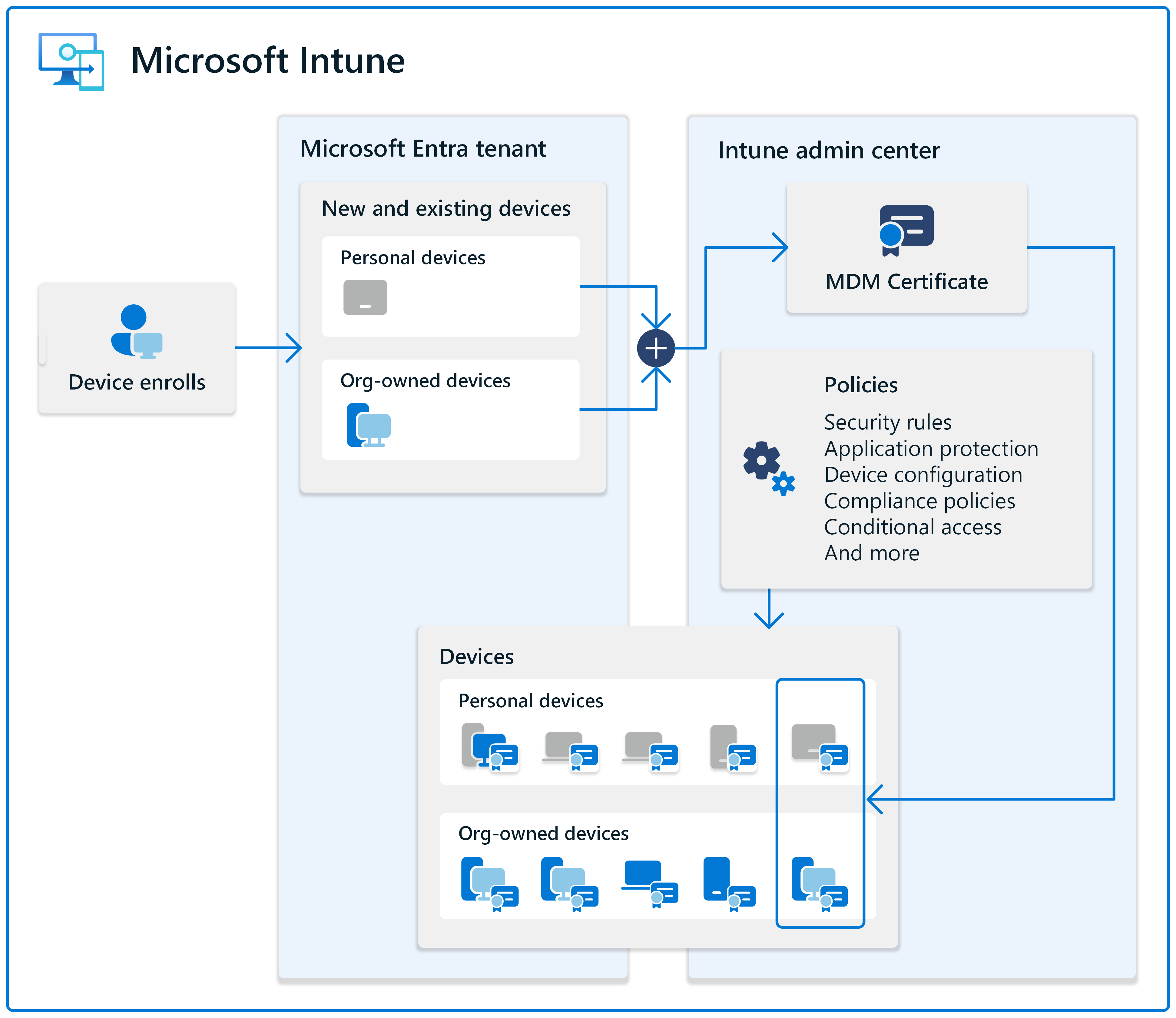
Security is often the primary driver behind Intune adoption, but many organisations underestimate the level of planning required to achieve meaningful protection. With intune mobile management, security is enforced through policies tied to identity rather than just devices. Conditional access, compliance policies and application protection work together to ensure that only trusted users on compliant devices can access sensitive data.
Key considerations include:
- Defining compliance policies that reflect real business risks, not just default settings
- Balancing security with usability to avoid workarounds by employees
- Ensuring integration with broader cybersecurity frameworks, including endpoint detection and identity protection
A poorly designed policy structure can either create security gaps or disrupt user workflows. This is where a structured approach often guided by a Microsoft Intune consultant, becomes critical.
Optimising IT Workflows Through Centralised Control
 Source Image Microsoft
One of the less discussed advantages of Intune is operational efficiency. Standardised device provisioning, automated policy deployment and remote management capabilities significantly reduce manual IT effort.
For IT managers, this translates into:
- Faster onboarding of new employees and devices
- Reduced dependency on physical device handling
- Centralised visibility across the entire endpoint environment
However, efficiency gains depend on how well processes are designed. Without proper planning, organisations may replicate old manual workflows within Intune, limiting its value. A well-implemented Intune mobile management environment should simplify operations, not just digitise existing inefficiencies.
Efficiency Benefits of Intune Mobile Management
Improve IT efficiency with Intune mobile management by automating device setup, centralising control, reducing manual workloads, enhancing user consistency and enabling faster issue resolution across distributed and growing business environments.
- Faster Device Provisioning: New users and devices can be onboarded quickly with pre-configured policies, significantly reducing setup time and reliance on IT teams.
- Centralised Endpoint Management: Managing all devices from a single platform improves visibility, control and eliminates the inefficiencies of multiple disconnected tools.
- Reduced IT Workload Through Automation: Automated updates, configurations and compliance checks minimise manual tasks, allowing IT teams to focus on higher-value initiatives.
- Consistent User Experience Across Devices: Standardised configurations ensure employees have reliable access and performance, regardless of device or location.
- Lower Support Dependency: Proactive policy enforcement and remote troubleshooting capabilities reduce recurring issues and helpdesk requests.
- Faster Issue Resolution: IT teams can remotely manage devices, apply fixes and enforce policies in real time, improving response and resolution times.
- Scalable IT Operations: As the business grows, endpoint management scales seamlessly without adding operational complexity or overhead.
Supporting Business Growth Without Rework
As businesses grow, their IT environments become more complex. New users, devices, locations and applications introduce variability that can quickly become difficult to manage.
Intune provides a scalable framework, but scalability is not automatic. It requires
- A well-structured policy hierarchy
- Clear device and user grouping strategies
- Consistent naming and configuration standards
Organisations that treat Intune as a short-term solution often face rework when scaling. In contrast, those who design with growth in mind can expand their environment without major disruption. This is particularly important for businesses planning mergers, acquisitions, or rapid workforce expansion.
Start Your Journey Toward Smarter, More Cost-Effective Endpoint Management
Cost Optimisation in Endpoint Management
While licensing costs are often the focus during evaluation, the real cost impact of Intune mobile management comes from operational efficiency and risk reduction.
Areas where businesses typically see cost benefits include:
- Reduced device support and troubleshooting time
- Lower risk of data breaches and compliance penalties
- Decreased reliance on multiple third-party tools
- Streamlined onboarding and offboarding processes
However, misconfiguration or poor adoption can lead to hidden costs, such as increased support tickets or security incidents. A strategic implementation supported by a Microsoft Intune consultant ensures that cost savings are realised over time, not just assumed at the outset.
Ensuring Secure Access Across Distributed Workforces
Business continuity is no longer limited to data backups and disaster recovery plans. Device availability and secure access are equally important.
With Intune, organisations can:
- Remotely manage and secure devices during disruptions
- Enforce access controls even when employees work outside corporate networks
- Quickly respond to security incidents by isolating or wiping devices
- These capabilities are particularly valuable in hybrid and remote work environments, where traditional network-based controls are less effective. A well-configured intune mobile management setup ensures that business operations can continue securely, regardless of location.
Implementation Risks and Common Pitfalls
Implementation risks include misconfigured policies, poor user experience, lack of testing, and weak governance. Without proper planning, organisations may face security gaps, compliance issues, increased support workload, and limited long-term value. Common risks include:
- Overly complex policy structures that are difficult to manage
- Lack of alignment between IT, security and business teams
- Insufficient testing before full deployment
- Ignoring user experience leads to resistance and non-compliance
Another frequent issue is underestimating the importance of ongoing management. Intune requires continuous monitoring, policy updates, and optimisation as the business evolves. Engaging a Microsoft Intune consultant helps mitigate these risks by bringing structured methodologies and real-world experience to the implementation process.
Related Blogs / Related Insights
As you evaluate your endpoint and mobility strategy, you might also find these topics helpful
How TECHOM Systems Supports Your Intune Strategy
For organisations assessing Intune, the challenge is rarely the technology itself, it’s the implementation, alignment and ongoing management.
TECHOM Systems works with businesses to design and deploy Intune mobile management solutions that integrate with existing IT environments. This includes aligning policies with business requirements, ensuring security frameworks are enforced correctly and supporting long-term optimisation.
Rather than focusing only on deployment, the emphasis is on creating a structured, manageable environment that delivers consistent value over time.
Frequently Asked Questions
1. What should businesses consider before implementing Microsoft Intune?
Businesses should evaluate their identity infrastructure, device landscape, compliance requirements and integration with existing Microsoft services. A clear policy and governance framework is essential before deployment.
2. How does intune mobile management improve security across endpoints?
It enforces compliance policies, conditional access and application protection to ensure only authorised users on secure devices can access business data, reducing the risk of breaches and data loss.
3. Can Intune mobile management support both corporate and BYOD environments
Yes, it allows organisations to manage corporate devices and apply secure controls to personal devices without compromising user privacy, making it suitable for hybrid and remote work models.
4. What are the common challenges during Intune implementation?
Challenges include policy misconfiguration, lack of alignment between IT and business goals, user resistance and insufficient testing before rollout. Proper planning and phased deployment help mitigate these risks.
5. How does Intune contribute to cost optimisation?
It reduces operational overhead by automating device management, minimising support efforts, consolidating tools and lowering the risk of costly security incidents or compliance failures.
6. Why is ongoing management important after Intune deployment?
Continuous monitoring, policy updates and optimisation are required to adapt to evolving security threats, business changes and user needs. Intune is not a one-time setup.
7. How can TECHOM Systems help us maximise our Intune investment?
Implementing endpoint management successfully requires more than just enabling tools. TECHOM Systems supports businesses with structured Microsoft Intune deployments, policy design, security alignment, and ongoing optimisation. We ensure your environment is secure, efficiently managed, and aligned with your long-term IT strategy visit our Contact Us page to speak with our consultants and get started.
Conclusion
Microsoft Intune offers a strong foundation for managing modern endpoints, but its success depends on how it is implemented and maintained. For business owners and IT leaders, the focus should be on aligning Intune mobile management with security, operational efficiency and long-term strategy.
A well-executed approach reduces risk, improves productivity and supports scalable growth. A poorly planned deployment, on the other hand, can introduce complexity and limit the platform’s potential.
Organisations that treat Intune as part of a broader IT strategy and invest in proper planning, governance and expertise are far more likely to achieve meaningful business outcomes.
Boost your business security and streamline device management with Microsoft Intune start today and stay in control effortlessly