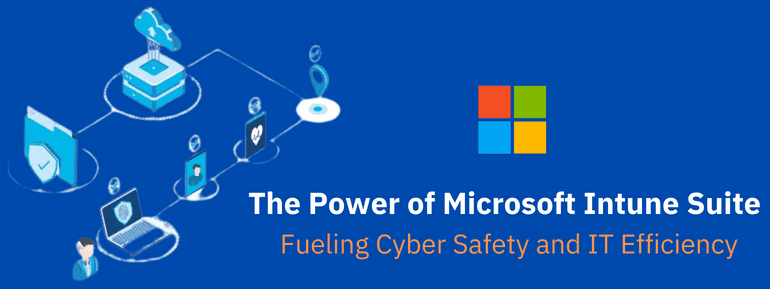
What is the Microsoft Intune Suite?
Microsoft Intune Suite is a set of advanced tools for managing and securing your computer systems. The suite works for both cloud-based and on-premises systems that are managed together. It's designed to help IT, and security teams stay on top of managing and securing systems before problems arise. You can get it with a monthly subscription plan that covers each user. The Microsoft Intune Suite is available as a per-user, per-month license plan. It unifies a range of advanced endpoint management and security capabilities into Microsoft Intune. It integrates with both cloud and on-premises co-managed devices through Microsoft 365 and Microsoft Security services.Intune Suite Pricing Chart
Let's take a quick look at the pricing table for the newly released Intune Suite. The Microsoft Intune Suite is a cloud-based solution that offers unified endpoint management.| Microsoft Intune Plan 1 $8.00 | Microsoft Intune Plan 2 $4.00 | Microsoft Intune Suite $10.00 |
|
A cloud-based solution for unified endpoint management. It is available with subscriptions to various plans such as Microsoft 365 E3, E5, F1, F3, Enterprise Mobility + Security E3 and E5, and Business Premium. |
An add-on to Microsoft Intune Plan 1 that adds advanced endpoint management capabilities. Microsoft Intune Plan 2 is part of the Microsoft Intune Suite. | An add-on for Microsoft Intune Plan 1 that integrates important advanced endpoint management and security solutions into a single package. |
Microsoft Intune Suite - Capabilities
First, let's look at what the Intune Suite can do. Over time, there have been a lot of Transformations to these important capabilities. Remote Help is an invaluable helpdesk tool, particularly as remote work becomes more prevalent. Currently, Remote Help is accessible to Windows users and will soon be made available for Android and Mac endpoints in upcoming updates.
This software allows IT helpdesk teams to troubleshoot a user's desktop and mobile devices while utilizing the user's company identity. The additional Android support will be especially advantageous for overseeing the devices of frontline workers.
The current version of Remote Help only works only for User Attended Support. There are two types of assistance that Remote Help can provide: screen sharing (view-only mode) or full control.
Remote Help is an invaluable helpdesk tool, particularly as remote work becomes more prevalent. Currently, Remote Help is accessible to Windows users and will soon be made available for Android and Mac endpoints in upcoming updates.
This software allows IT helpdesk teams to troubleshoot a user's desktop and mobile devices while utilizing the user's company identity. The additional Android support will be especially advantageous for overseeing the devices of frontline workers.
The current version of Remote Help only works only for User Attended Support. There are two types of assistance that Remote Help can provide: screen sharing (view-only mode) or full control.
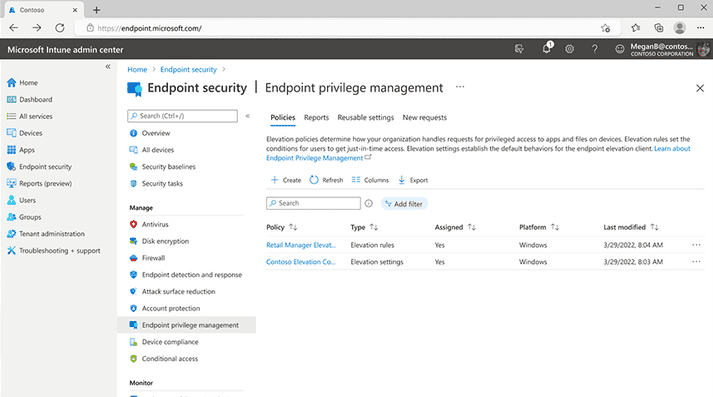
 Endpoint Privilege Management will be available for preview in March 2023 and generally available in April 2023. This tool will allow for controlled elevation of Windows standard users, reducing the likelihood of security issues impeding productivity.
This system will ensure that the appropriate users have the necessary privileges at the right moment, decreasing the potential security risk of users having too many privileges. Additionally, this system will allow for greater self-serve in basic scenarios, like setting up a local printer, thus reducing the burden on the help desk.
Endpoint Privilege Management will be available for preview in March 2023 and generally available in April 2023. This tool will allow for controlled elevation of Windows standard users, reducing the likelihood of security issues impeding productivity.
This system will ensure that the appropriate users have the necessary privileges at the right moment, decreasing the potential security risk of users having too many privileges. Additionally, this system will allow for greater self-serve in basic scenarios, like setting up a local printer, thus reducing the burden on the help desk.
 The Microsoft Intune Suite provides IT administrators with Advanced endpoint analytics capabilities, which leverage data-driven insights to enhance their comprehension, anticipation, and enhancement of user experiences for organisational staff.
As of Intune Service Release 2302, Microsoft Tunnel for MAM has been released for general availability. It is now possible to incorporate Microsoft Tunnel for Mobile Application Management into your tenant. The MAM tunnel allows unenrolled Android and iOS devices to establish connections.
The Microsoft Intune Suite provides IT administrators with Advanced endpoint analytics capabilities, which leverage data-driven insights to enhance their comprehension, anticipation, and enhancement of user experiences for organisational staff.
As of Intune Service Release 2302, Microsoft Tunnel for MAM has been released for general availability. It is now possible to incorporate Microsoft Tunnel for Mobile Application Management into your tenant. The MAM tunnel allows unenrolled Android and iOS devices to establish connections.
And...
By approaching your security policies, this solution lets mobile devices safely access corporate resources, so employees can use company assets from their mobile devices as needed. In practice, this gives your tenant a low-impact VPN solution. The Intune Suite enhances the Management of Specialty Devices, allowing employees the freedom to select the devices they require to complete their tasks, all while ensuring that these devices do not create security vulnerabilities for the organisation. After its launch on March 1, 2023, the Intune Suite will gain an additional advanced app management feature. This will furnish an enterprise app catalogue and controls that facilitate app discovery, deployment, and automatic updating to mitigate the risks of outdated applications. Over time, Microsoft will continue to augment the Intune Suite with further advanced capabilities. Later in the year, Microsoft is planning to introduce a Cloud Certificate Management solution that will allow the issuance and administration of VPN and Wi-Fi certificates from Intune to devices that lack on-premises infrastructure. That will provide increased endpoint security, automation, user computing landscape and experience management.Microsoft Intune Suite Subscription Plans
Microsoft Intune Suite has several subscription plans to fit the needs and budgets of different businesses. Intune has features for everyone, from simple endpoint management to more advanced security. Evaluating the business needs and choosing the best subscription that meets those needs is crucial.- Standalone add-ons: Some of the capabilities of add-ons, like Remote Help, are usable as Standalone.
- Microsoft Intune Plan 2: Offers advanced endpoint management capabilities like managing and configuring special devices and Microsoft Bridge for Mobile Application Management.
- Microsoft Intune Suite: Brings together many mission-critical advanced endpoint security and management capabilities. The suite's capabilities are integrated with Microsoft 365 and Microsoft Security across endpoint platforms for both cloud and on-premises devices that are co-managed. The Intune Suite has Remote Help (which can be used on its own) and all of the capabilities of Intune Plan 2.
- Navigate to the Microsoft Intune admin centre.
- Choose Tenant administration > Intune add-ons.